- Must be user-friendly, intuitive, and cost-effective
- Must mimic some existing technology in the classroom
- Must add some new value over previous technology
I know the first requirement is a bit of a "duh!", but I think we all see too many examples where technology gets way too complicated and thus is left around to collect dust. These are our early 21st century paperweights.
So, let me now offer two examples, and the possible next step from our current state.
EXAMPLE 1:
Example 1 is the move from school slate and chalk, to pencil and paper, to a possible move one day to some form of tablet device:
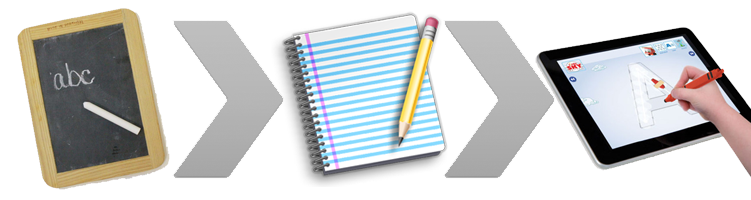
Yes, this a very simplistic example; however, it also perfectly demonstrates the three requirements. The move away from the slate came because pencil and paper was a very easy transition to make and is cost effective. The pencil/paper option was a perfect mimic of the slate option, but added tremendous value in that you did not have to erase your work but could instead just turn the page. Thus students could retain all their lessons from the day for study later.
Will we see a move to tablets in the future? Some schools, colleges, and companies have already begun to experiment with this option.
Advantages include the ability to take notes, load classwork and homework, and submit all of it for review, automatic scoring by the system, saving teachers a great deal of time, the ability to track subject-related strengths and weaknesses so as to better target solutions, and many other possibilities. Weaknesses include cost, higher level of complexity, and the need for regular onsite tech support.
EXAMPLE 2:
Example 2 is somewhat similar to the previous example in that it's the move from classroom blackboards, which were the norm even when I was in college, to the whiteboard, to a possible future of some kind of Smartboard:

The move from blackboard to whiteboard is a no-brainer, even though that move is relatively recent from a long-term historical viewpoint. Whiteboards are cheaper, cleaner, easier to maintain (unless you decide you want to use regular markers on the board rather than dry erase markers), and easier to view from any point in the classroom. In addition, it's easier to use various marker colors in creating lists or illustrating concepts. Yes, there was colored chalk, but how often did teachers / professors use colored chalk? From my memory, almost never.
The move from blackboard to whitebard clearly follows all three CTI requirements, though the move to a classroom "Smarboard" system may not. Having used Smartboards in the past, they do offer some distinct advantages, such as the ability to display the board to both in-room and remote participants, the ability to view and play many types of media, and the ability to create lists and diagrams just as one would with a whiteboard, only with the ability to save the work and send it out to participants. In addition, teachers could load curricula to their boards, including interactive assignments and reuse content over and over again without having to take time to write anything themselves. if a curriculum program is updated, the content is automatically updated for the Smartboard as well, thus saving teachers a great deal of administration time.
Weaknesses include the cost (many thousands of dollars per unit) as well as the complexity of learning how to effectively utilize the system. Time saved writing assignments on a board would be lost to pulling up files or other various tasks. Also needed are improvements to the overall usability of the Smartboard systems.
That said, we're now seeing the appearance of Smart Television systems which will ultimately become much cheaper and may become the solution of choice for classrooms. Private businesses are already starting to integrate Smart TV systems for their use. Colleges and universities will follow (if they haven't already, and K-12 systems will then likely adopt the systems as well.
In addition, the use of Smart TV systems give numerous companies the opportunity to develop "learning apps" to use with the boards, which will greatly lower the cost of each system while expanding usability and effectiveness.
It goes without saying that eventually, if tablets and Smartboards do become the next generation of classroom technology, they'll need to be integrated in some manner. This too becomes an opportunity for companies and one can already see some forethought on the part of Google with their recently launched Google Classroom system.
So, what are your thoughts? Are the CTI principles flawed in any way you can see? Are there better examples? I look forward to your comments.

